What a GPU hour buys: $7.03 or $0.12 per million tokens on an H100
On this page
How it was measuredResultsWhat the numbers showHow to use this on your own GPUsMethod notesThe cost of a generated token is the price of a GPU hour divided by the number of tokens that hour serves. The price is fixed when the GPU is bought or booked. The number of tokens is not: it depends on how much work the GPU is given. We measured that second number on an NVIDIA H100 NVL, from 1 to 256 users at once, with the GPU's own energy counter running the whole time.
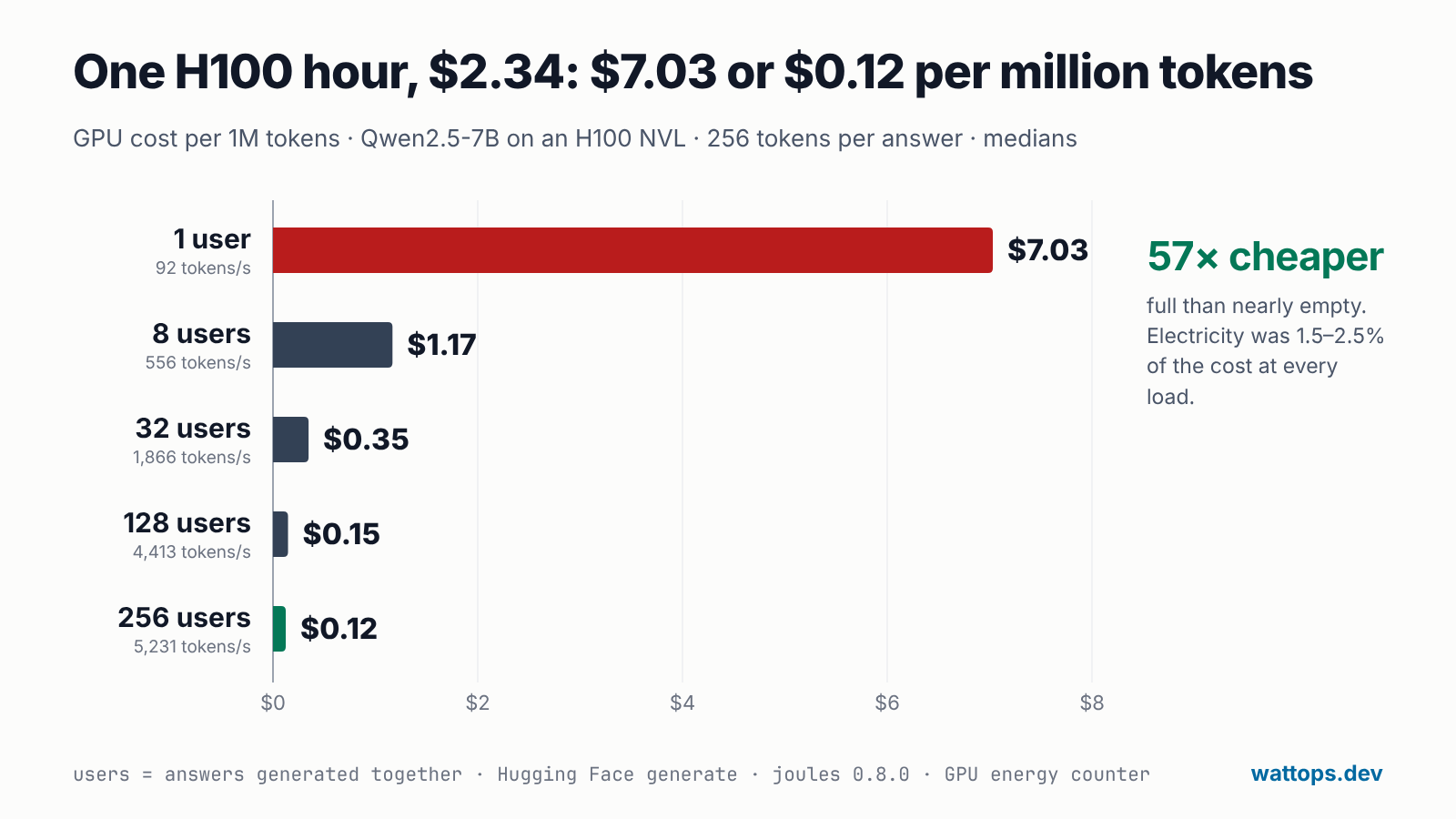
The result: at $2.34 per GPU hour, the same H100 served a million tokens for $7.03 at 1 user and $0.12 at 256, 57 times less, and used 97% less GPU energy per token. Electricity was 1.5 to 2.5% of the cost at every load. What sets the cost of a token is how full the GPU is.
How it was measured
- GPU: one NVIDIA H100 NVL with a 400 W power limit.
- Model: Qwen2.5-7B-Instruct in bf16, served with Hugging Face
generate(transformers 4.57.6, PyTorch 2.11). - Load: 1, 8, 32, 128 and 256 users. A "user" is one answer generated in the same batch as the others. Every answer was exactly 256 new tokens, so each load did a known amount of work.
- Energy: joules 0.8.0 read the GPU's energy counter through NVML, with one phase per load and three rounds, and the medians are reported. Idle power with the model loaded was measured first, for 20 seconds.
- Cost: the GPU hour is priced at $2.34; cost per million tokens is that price divided by the tokens served in an hour. Electricity per million tokens is the measured energy at $0.15 per kWh.
Results
| Users at once | Tokens/s | GPU energy per token | Average power | GPU cost per 1M tokens | Electricity per 1M tokens |
|---|---|---|---|---|---|
| 1 | 92.3 | 2.634 J | 243 W | $7.03 | $0.110 |
| 8 | 556.0 | 0.419 J | 233 W | $1.17 | $0.017 |
| 32 | 1,865.7 | 0.147 J | 275 W | $0.35 | $0.006 |
| 128 | 4,413.0 | 0.086 J | 378 W | $0.15 | $0.004 |
| 256 | 5,231.2 | 0.076 J | 395 W | $0.12 | $0.003 |
Idle, with the model loaded and nothing to do, the H100 drew 89.1 W.
What the numbers show
The load sets the cost, not the GPU. From 1 user to 256, power went up 1.6 times (243 W to 395 W) while tokens per second went up 57 times. The GPU's hourly price did not change, so its cost per token fell with every user it was given.
Electricity is the small part. At every load, electricity was 1.5 to 2.5% of the cost of the GPU hour. Saving energy per token is worth doing, and it is a measure of efficiency, but the larger saving is in keeping the GPU busy.
The gains flatten. From 32 to 128 users the cost per token fell from $0.35 to $0.15. From 128 to 256 it fell only from $0.15 to $0.12, while tokens per second rose 19% and power rose to 395 W, close to the card's 400 W limit. Past that point a bigger batch mostly makes each answer wait longer: a batch of 256 answers took 12.4 seconds, against 7.4 seconds for 128. On this setup the useful range is around 128 users; on another model or GPU it is somewhere else, which is why it is worth measuring.
An underused H100 uses more energy per token than a T4. A second test ran a smaller model, Qwen2.5-0.5B in fp16, with the same code on a Tesla T4 and on an H100 NVL (128 new tokens per prompt, greedy decoding, five alternating rounds, medians):
| Batch | Tesla T4: energy per token | H100 NVL: energy per token | H100 against the T4 |
|---|---|---|---|
| 1 | 1.229 J (31 tokens/s) | 1.451 J (74 tokens/s) | 18% more energy per token, 2.4× as fast |
| 4 | 0.312 J (121 tokens/s) | 0.360 J (295 tokens/s) | 15% more |
| 16 | 0.113 J (475 tokens/s) | 0.094 J (1,170 tokens/s) | 17% less, 2.5× as fast |
The H100 has a much larger chip to keep running. It read about 60 W doing nothing, where a T4 reads about 13 W. A 0.5B model cannot fill an H100, so at batch 1 most of its energy went to that baseline. Given enough work, the bigger GPU used less energy per token than the smaller one.
fp16 is not always faster. With the same 0.5B model at batch 8 on the H100, fp16 used 13% less GPU energy per token than fp32 (0.201 J against 0.232 J) but generated about 11% fewer tokens per second (518 against 581). Decoding a small model one token at a time waits on memory and on launching kernels more than on arithmetic, so the H100's fp16 tensor cores had little to do: the saving came from lower power, not from finishing sooner. The answers were the same quality: perplexity 27.545 (fp16) against 27.536 (fp32) on a fixed text, and 85.4% of the generated tokens were identical position by position.
How to use this on your own GPUs
The numbers above belong to one model on one GPU. The method works for any model, and it answers questions a team can act on.
- Measure idle first. Load the model, do nothing for 20 to 30 seconds, and measure. This is the power the GPU draws whatever it serves, and the floor under every number that follows.
- Sweep the loads you actually see. Run your model at the batch sizes or concurrency your traffic has, with a fixed number of output tokens so every load does known work. Warm up every load before measuring it, and alternate the loads over a few rounds so heat and clock drift hit all of them.
- Turn tokens per second into cost. Cost per million tokens is your price per GPU hour × 1,000,000 ÷ (tokens per second × 3,600). Add electricity from the measured joules per token if you want the full cost.
- Find where the curve flattens. That is the batch size or concurrency limit to set in your server: beyond it, users wait longer for little saving.
- Weight by your real traffic. If a GPU spends most of its hours at low load, its real cost per token is close to the low-load number, whatever the peak looks like. The hours at each load matter more than the best case.
- Measure again when something changes: a new model, a new precision, a new server or a new GPU type. The fp16 result above shows that a change that helps one setup can do little for another.
In code, the measurement is a few lines with joules:
import joules

PRICE_PER_GPU_HOUR = 2.34          # what a GPU hour costs you

with joules.Session(gpus=[0]) as s:
    for users in (1, 8, 32, 128, 256):
        generate(users)                              # warm-up at this load, not measured
        with s.phase(f"{users} users") as p:
            tokens = generate(users)                 # your model, answering this many requests at once
        tps = tokens / p.duration_s
        print(f"{users:>3} users: {p.energy_j / tokens:.3f} J per token, "
              f"${PRICE_PER_GPU_HOUR * 1e6 / (tps * 3600):.2f} per million tokens")
For a server rather than a script, run the same sweep against its endpoint while joules run or a joules.Session measures the GPU; the LLM energy guide covers Ollama, vLLM and llama.cpp. On a GPU that several jobs share, joules agent gives each job its own share of the energy by its SM time: how that split works, and a test of it.
Method notes
- The first round at 8, 128 and 256 users was cold. It took about 100 seconds instead of 4 to 12, because the test warmed up only the 1-user and 32-user batch sizes. With three rounds and one cold one, each median above is the higher of the two warm rounds, which agree within 1 to 4%: the cold round does not move it, and nothing was left out by hand. One user's energy per token also rose across the rounds (2.48, 2.63, 2.73 J).
- Fixed batches, not a server. Hugging Face
generatewith fixed batches is not how a production server works; vLLM and similar servers batch requests as they arrive, so their numbers differ. The shape of the result, a full GPU being far cheaper per token, is what carries over. - Two machines. The 7B test and the 0.5B test ran on two different H100 NVL machines, each in one session.
- GPU board energy only, not the CPU, memory or the power at the wall. The price per GPU hour and the price of electricity are inputs: put in your own, since the tokens per second and the energy per token are what was measured.