fp16 mixed precision in training: about 70% less GPU energy per step on a T4
On this page
The jobHow it was measuredResultsWhy the saving is all timeThe two sessions disagree on joules, and agree on the savingThe trap: fp16 on two GPUs that was really fp32What this does and does not tell youRun it yourselfLast week we measured a pure matrix multiply on a Tesla T4: fp16 used 81 to 84% less GPU energy than fp32. That is the best case. A training step does more than multiply matrices, so we measured a real training loop too: a BERT model in Hugging Face Trainer, fp32 against fp16 mixed precision, read from the GPU's own energy counter.
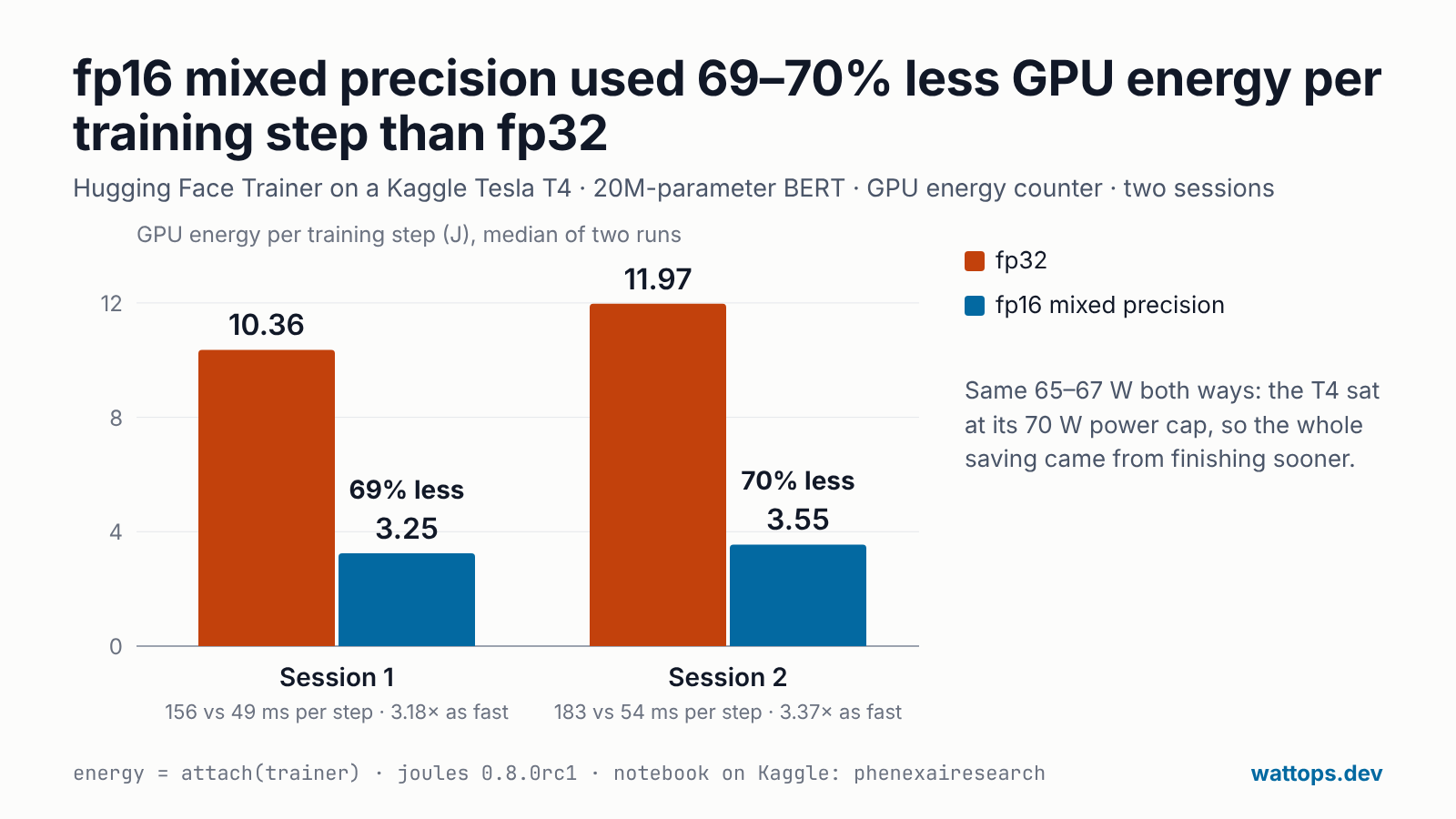
The result: fp16 mixed precision used 69 to 70% less GPU energy per training step and ran 3.2 to 3.4× as fast, in two separate Kaggle sessions. Still a large saving, and closer to what you would see in your own run than the matrix-multiply number.
To run it yourself, open the Kaggle notebook: it prints your own numbers on a Kaggle T4.
The job
- Model: a BERT classifier built from a config, so nothing is downloaded: 6 layers, hidden size 512, 8 attention heads, 20.3M parameters.
- Data: 4,096 random sequences of 128 tokens, with a label the model can learn (the first token's parity). Made once, in memory, so the GPU never waits for the CPU to build a batch.
- Training: Hugging Face Trainer, batch 32, 256 optimiser steps (2 epochs) per run. The only difference between the two sides is
TrainingArguments(fp16=True). - GPU: one Tesla T4 in a Kaggle notebook (accelerator GPU T4 x2, training on GPU 0 only; the reason is below).
How it was measured
- GPU energy comes from the GPU's own energy counter, read through NVML by the joules callback for Trainer. It is the GPU board only, not the CPU and not power at the wall.
- Alternating runs: fp32, fp16, fp32, fp16, so heat and clock drift hit both sides. A 4-epoch run before them warmed the GPU up.
- Two sessions: the whole comparison was run in two separate Kaggle sessions, to see whether the result holds on another day and possibly another card.
- A check that fp16 took effect: the fp16 runs logged different losses from the fp32 runs. When they are identical, mixed precision did not reach the model and the comparison compares nothing (see the trap below).
One line adds the measurement to an existing Trainer script:
from joules.integrations.huggingface import attach

trainer = Trainer(model=model, args=TrainingArguments(output_dir="out", fp16=True), train_dataset=train)
energy = attach(trainer)
trainer.train()
print(energy.result["j_per_step"])
attach puts the callback first in the Trainer's list, so energy/joules, energy/kwh, energy/avg_watts and energy/joules_per_step appear in every log the Trainer sends to W&B, TensorBoard, MLflow or any other report_to, next to the loss.
Results
| Run | Session 1: J per step | ms per step | Session 2: J per step | ms per step |
|---|---|---|---|---|
| fp32, round 1 | 10.46 | 157 | 11.94 | 182 |
| fp16, round 1 | 3.27 | 49 | 3.58 | 55 |
| fp32, round 2 | 10.26 | 154 | 12.00 | 183 |
| fp16, round 2 | 3.24 | 48 | 3.51 | 53 |
| Median fp32 · fp16 | 10.36 · 3.25 | 156 · 49 | 11.97 · 3.55 | 183 · 54 |
| fp16 saving | 69% less | 3.18× as fast | 70% less | 3.37× as fast |
| 4-epoch warm-up run, fp32 | Session 1 | Session 2 |
|---|---|---|
| Average power | 66 W | 66 W |
| Time held back by the 70 W power cap | 99% | 98% |
| Clock, share of its maximum | 60% | 51% |
| Busy | 97% | 96% |
| Temperature, start → end | 54 → 81 °C | 51 → 80 °C |
| Spread between epochs (energy) | 2.0% | 8.7% |
Why the saving is all time
- The same power both ways. Every run averaged 65 to 67 W. The T4 is capped at 70 W and sat at the cap almost the whole time, so neither precision could draw more. Energy is power × time, so the whole saving came from finishing sooner.
- Tensor cores, and no TF32. The T4 is a Turing GPU. Its tensor cores run fp16 matrix multiplies; it has no TF32, so fp32 matrix multiplies run on the ordinary CUDA cores.
- Why not 84%. A training step also does work that fp16 does not speed up as much: the optimiser step, normalisation, softmax, the loss, moving data. Mixed precision also keeps some of the work in fp32 on purpose, to keep training stable. So the matrix-multiply number is the ceiling, and a real step lands below it.
The two sessions disagree on joules, and agree on the saving
Session 2's numbers are 9% (fp16) to 16% (fp32) higher than session 1's. Its T4 held a lower clock under the same 70 W cap (51% of its maximum against 60%), and Kaggle can hand out a different card each session. In session 2 each epoch of the warm-up run also cost more than the one before (1,359 → 1,591 J) as the card heated, which is why its epochs spread 8.7% against 2.0%.
The saving still agreed to one point: 69% and 70%. That is the practical rule: compare runs inside one session, on one machine, never across. A number from last week's session is not a baseline for this week's.
The trap: fp16 on two GPUs that was really fp32
On Kaggle's GPU T4 x2, our first run used both GPUs. The Trainer then wraps the model in PyTorch DataParallel, and in that run (transformers 5.x) the fp16 runs logged exactly the same losses as the fp32 runs: mixed precision never reached the copies of the model on each GPU, so the "fp16" side was fp32. That run's comparison is void, and the numbers above all come from runs on one GPU.
If you train on more than one GPU, check that fp16 and fp32 losses differ, or launch with torchrun so the Trainer uses DistributedDataParallel. A measurement that shows no change at all is worth a second look before anyone concludes that mixed precision saves nothing.
What this does and does not tell you
- It is one small model on random data, one GPU model, two rounds a side in each of two sessions: a solid first look, not a benchmark of every workload.
- On an A100, H100 or L4, fp32 matrix multiplies can use TF32 on the tensor cores, so expect a smaller gap between fp32 and mixed precision there. bf16 is the usual choice on those cards. Measure it rather than assume it.
- It is GPU board energy only. The CPU, memory and the rest of the machine are not in these numbers.
Run it yourself
The quickest way: open the Kaggle notebook, click Copy & Edit, set the accelerator to GPU T4 x2 and click Run All. It trains on one T4, runs the four alternating runs and prints the comparison, with the loss check.
In your own training script:
pip install -U landauer-gapthen energy = attach(trainer) before trainer.train(), as above. The training guide covers Trainer and PyTorch Lightning, saving runs with track=, and multi-GPU runs. Nothing leaves the machine unless you ask it to.
On a GPU that several jobs share, the same counter can be split between them by each job's SM time: how that works, and a test of it.